Write connections
Overview
Write connections allow tags to be written to other driver connections beyond their original driver connection.
Write connection overview
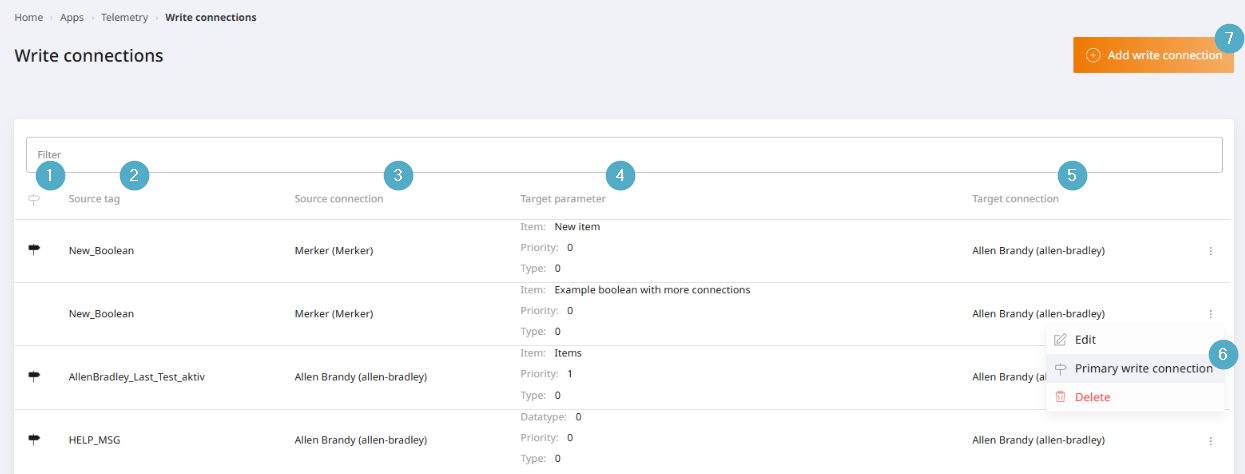
Primary write connection: Column for identifying primary writing connections. If the icon is displayed, this indicates a Primary write connection. You can sort the list to display all primary writing connections at the top or bottom.
Source tag: A tag whose value is written to the target tag.
Source connection: The driver connection and driver type of the source tag.
Driver parameters: Parameters of the target connection used to uniquely address the write target. The parameters displayed depend on the driver type of the target connection.
Target connection: The driver connection and driver type of the write target.
Options menu: The starting point for changing the primary write connection, as well as for editing and deleting.
Add write connection: Starting point for adding a write connection. Opens a dialogue box.
Primary write connection
A tag can have several write connections, but only one of them is the primary write connection.
If the tag’s original driver connection is bidirectional or write-enabled, that is the primary write connection.
For read-only tags, any write connection can be designated as the primary write connection.
The behaviour of primary writing combinations is as follows:
Write operations are executed on the primary write connection first.
Further write connections are only written to if the write operation on the primary write connection was successful.
System events and entries in the event log are based on the primary write connection.